FairPlay Forgot Password: Complete Account Recovery Guide for Login, OTP & Password Reset Issues
You open the app two minutes before a crucial IPL match. You tap login, enter your password and nothing. Wrong credentials. You try again. Still wrong. Now you’re staring at a locked screen with wallet balance you can’t touch, and a match that’s already in its first over.
That panic is real, and if you’re here, you’ve probably already lived some version of it.
The good news: FairPlay forgot password situations are almost always fixable within a few minutes, even during peak traffic. The bad news is that most people make the problem worse by repeatedly hammering the login button or requesting five OTPs in a row. This guide walks you through what’s actually happening behind the scenes and how to fix it fast without digging yourself deeper into a lockout.
Table of Contents
Why FairPlay Password Reset Issues Happen
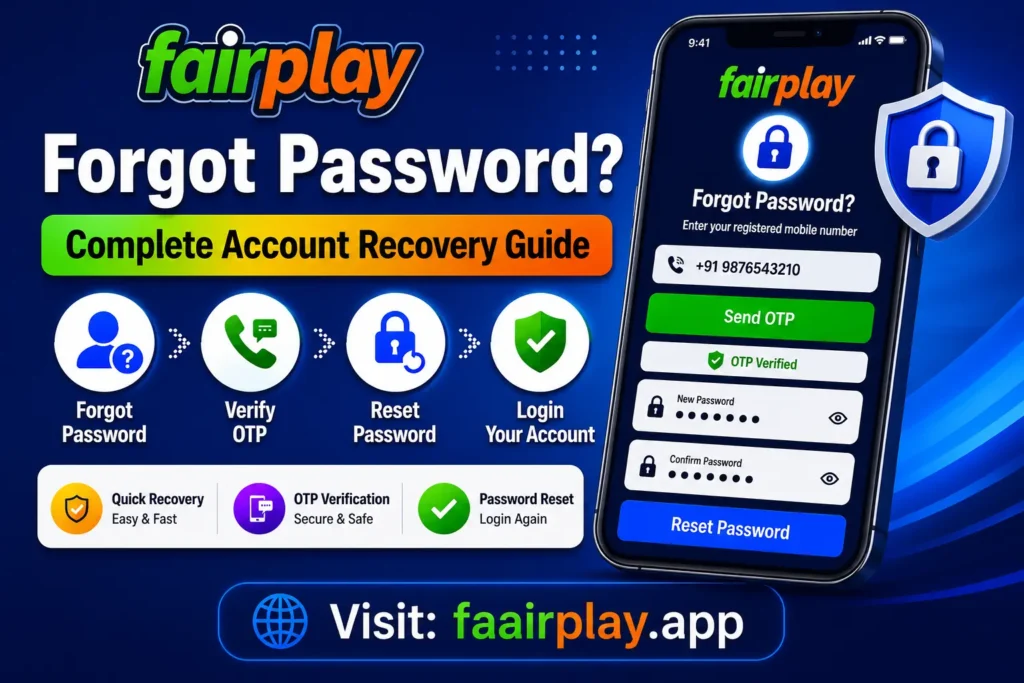
FairPlay login failures aren’t random. The platform runs fairly aggressive session management and login security which is actually a good thing for your wallet but it means certain behaviors trigger automatic protections that feel frustrating when you’re on the right side of them.
Here’s what’s actually causing most password reset and login issues:
Forgotten password is the obvious one. But more often the real issue is that the password stored in your phone’s autofill is outdated. You changed your password two months ago, your browser or phone saved the new one incorrectly, and now your device is submitting the wrong credentials silently. You think you’re typing the right password. You’re not.
Session expiration is another constant culprit. FairPlay uses relatively short session tokens if you haven’t logged in for a while or left the app running in the background, your session silently expires. When you come back and try to interact, it’ll either log you out entirely or loop you back to a login screen with no clear explanation.
Device switching triggers re-authentication. If you logged in on your laptop, then switched to your phone without logging out first, the platform may flag the second login as a suspicious access attempt depending on how the IP geolocation looks. This is especially common when using fair play app via a browser on a device that hasn’t been verified before.
App reinstall situations are messy. When you reinstall the FairPlay app or clear app data, the locally stored session token gets wiped. Even if you remember your password perfectly, some users hit a verification loop where the app doesn’t recognize the device and asks for fresh OTP verification before allowing login.
Repeated failed login attempts are what push most users from a simple password issue into a temporary lockout. The platform watches for rapid consecutive failed logins it interprets this as either a brute force attempt or credential stuffing, and it will throttle or temporarily block access automatically. This is exactly why trying the same wrong password five times in a row makes everything worse.
Step-by-Step FairPlay Password Recovery Process
Don’t rush this. Most failed recovery attempts happen because users skip steps or try to speed through verification. Go in order.
Step 1: Open the Correct Login Page
If you’re using the app, make sure it’s updated. Outdated app versions sometimes have login flow bugs where the forgot password functionality doesn’t route correctly. If you’re on a browser, go directly to the FairPlay URL you normally use don’t search for it through Google and click an affiliate redirect, because those sometimes land you on mirror sites with different login infrastructure.
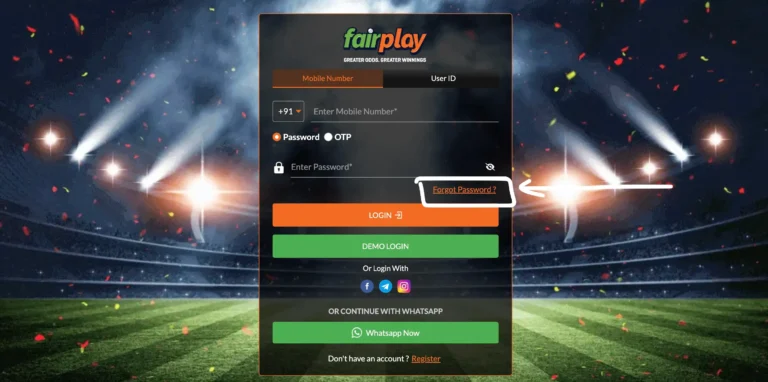
Step 2: Tap “Forgot Password”
On the FairPlay login screen, the forgot password link is typically below the password field. Tap it once. Don’t tap it multiple times each tap can generate a new OTP request which invalidates the previous one, creating a chain of useless OTPs that confuses the verification system.
Step 3: Enter Your Registered Mobile Number
Enter exactly the number used during fairplay register. If you registered with a +91 number, enter it the same way the platform expects with or without the country code depending on what the field accepts. A mismatch here will either return “number not found” or route the OTP to a ghost number that doesn’t exist in the system.
Step 4: Wait for the OTP
This is where most people lose patience. The FairPlay OTP can take anywhere from 10 seconds to 3-4 minutes depending on SMS gateway load. During IPL season this delay gets significantly worse. Don’t request another OTP unless at least 2 minutes have passed. More on this below.
Step 5: Enter OTP and Set New Password
Once you receive the OTP, enter it quickly these typically expire within 5 to 10 minutes. Set a new password that you haven’t used on this platform before. The system may reject recently used passwords.
Step 6: Login With New Credentials
After resetting, wait 30-60 seconds before trying to log in. Some users try to log in immediately after reset and hit a session propagation delay where the new password hasn’t fully synchronized across the authentication server yet. Give it a moment.
FairPlay OTP Not Received? Real Fixes That Actually Work
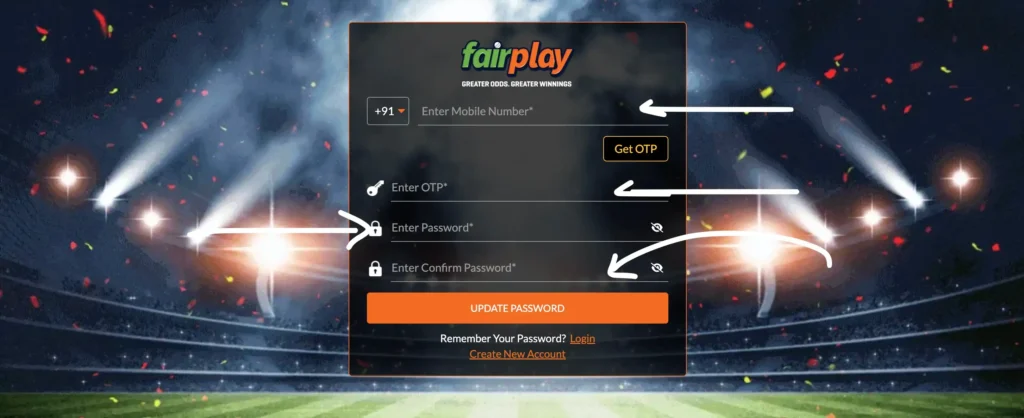
This section deserves the most attention because FairPlay OTP not received is by far the most common sticking point in the entire password recovery process, and the reasons behind it are more varied than most people realize.
The IPL Traffic Problem
IPL betting traffic during prime time slots especially during evening matches or toss time creates enormous spikes in SMS OTP requests across every betting platform simultaneously. When millions of users are requesting OTPs at the same moment, SMS gateways hit their processing limits and start queuing messages. Your OTP doesn’t disappear; it’s sitting in a queue. The problem is that by the time it arrives, you’ve already requested three more OTPs and all of them invalidate each other.
The fix: request one OTP, then genuinely wait. Set a 3-minute timer. Don’t touch the resend button.
Telecom Provider SMS Delays
SMS verification delay issues are often on the telecom side, not FairPlay’s side. Certain carriers particularly in tier-2 and tier-3 cities have slower SMS routing infrastructure for transactional messages. BSNL and some regional MVNO networks are especially notorious for this. If you consistently have OTP delays and your friends on Jio or Airtel don’t, your carrier’s SMS infrastructure is probably the issue.
Fix: refresh airplane mode (turn it on for 10 seconds, then off). This forces your phone to re-register with the nearest tower and can clear a stalled SMS queue.
DND Filtering The Silent Killer
DND filtering blocks promotional SMS, but sometimes it also incorrectly catches transactional OTP messages because of how the SMS sender ID is classified. If you’ve opted into full DND on your number, some telecom providers blanket-block all automated SMS including OTPs.
Check your DND status through your carrier’s app or by texting the TRAI DND verification number. If you’re on full DND, you need to partially unsubscribe to allow transactional messages. This takes a few hours to propagate after changes are made.
Multiple OTP Invalidation
Here’s something the FairPlay support team doesn’t explain clearly enough: every time you hit “resend OTP,” the previous OTP becomes instantly invalid. If you’ve hit resend four times in quick succession, you now have four OTPs queued in transit, and only the last one will work but you won’t know which one is last unless you let all four arrive and try the most recent one.
The smarter approach: if you’ve accidentally requested multiple OTPs, wait for all of them to arrive (they might come in reverse order), and only use the most recently sent one.
Dual SIM Confusion
If you’re using a dual SIM phone, check which SIM slot your registered number is on, and confirm that the SIM is currently active and in the slot that receives SMS. Some phones default SMS reception to SIM 1 regardless of which number is registered. If your FairPlay number is on SIM 2 but your phone is routing SMS to SIM 1, the OTP is arriving on the wrong line.
App Refresh Behavior
On some Android versions, if the FairPlay app is running in the background and your phone’s battery optimization is aggressive, the app may get suspended exactly while waiting for OTP entry. When you come back to the app, it may have reset the OTP input screen. Close the app fully, go to your SMS inbox, note the OTP, then reopen the app and manually type it in.
VPN Interference
If you’re using a VPN while trying to complete FairPlay password reset, this can cause two problems: the platform may flag the geographic mismatch between your registered location and your apparent VPN IP, triggering additional verification steps, and some SMS gateways don’t complete delivery when the receiving session appears to originate from a foreign IP. Turn off VPN before requesting an OTP.
Why FairPlay Account Gets Temporarily Locked
A FairPlay account locked situation almost always traces back to one of three things.
The first is consecutive failed login attempts. Most platforms including FairPlay implement automatic lockouts after 5-7 failed attempts within a short window. The lockout is usually temporary somewhere between 15 minutes and 2 hours depending on how many attempts were made. The platform won’t always tell you how long the lockout lasts, which adds to the frustration, but waiting it out genuinely works.
The second is suspicious login detection. If you logged in from Delhi yesterday and the system sees a login attempt from a Bangalore IP today, it may flag this as a possible account takeover and temporarily restrict access pending verification. This is especially common when using a new device or when your ISP assigns you a new IP from a different region. The fix usually involves completing a fresh OTP verification from your registered number.
The third is automated protection triggered by bot-like behavior. If you were using a password manager that auto-submitted incorrect credentials repeatedly, or if you had an old browser tab with a saved login that kept retrying in the background, the platform’s security system may have interpreted this as a scripted attack. This type of lockout typically requires Fairplay support intervention to resolve.
During a lockout, don’t keep trying to log in. Every additional failed attempt during a lockout extends the lockout window or escalates it to a manual review queue. Step away, wait, then try the password reset process fresh.
How to Recover FairPlay Account Without Mobile Number
This is a genuinely difficult situation FairPlay account recovery without the registered phone number involves escalating to human support with identity verification. There’s no fully automated path for this, and anyone telling you otherwise is likely running a scam.
Here’s the realistic process:
Start with WhatsApp support. WhatsApp support is typically the fastest channel for fairplay club account recovery. Have the following ready before reaching out: your registered name exactly as entered during fairplay register, your registered email address if you provided one, approximate registration date, last deposit amount and payment method, and your betting wallet access history if you can recall recent transaction amounts.
KYC verification is what makes this possible. If you completed KYC on your account (PAN card or Aadhaar verification), the support team can verify your identity through those documents even without the registered phone number. This is one of the biggest practical reasons to complete KYC even if it’s optional it’s essentially your account recovery insurance.
If your number has changed or is no longer active, you’ll need to provide transaction proof showing the UPI ID or bank account used for deposits. This helps support confirm you’re the actual account owner and not someone trying to access someone else’s account.
Registered email recovery is possible if you linked an email during registration. Some accounts can have OTP routed to email as a fallback, though this depends on how the account was set up.
Expect the manual recovery process to take 24-72 hours. This is not something support can rush unless you have very strong documentation. Be patient and provide complete information in your first contact back-and-forth messages add days to the process.
Common Login Problems After Password Reset
Successfully resetting your password doesn’t always mean smooth sailing. Several FairPlay unable to login scenarios happen specifically after a password reset.
App login loop is the most common post-reset issue. You enter your new credentials, the app shows a loading spinner, then returns you back to the login screen with no error message. This is almost always a browser cache issue or stale app session conflict. Fix it by force-closing the app completely, clearing the app cache from your phone settings (not the same as uninstalling), then reopening. On browsers, clear cookies and cached data for the FairPlay domain specifically.
Invalid credentials error after reset sometimes means you’re entering the new password incorrectly autocorrect on mobile keyboards can silently modify passwords as you type, especially if they contain special characters. Turn off autocorrect before entering your new password, or paste it from a password manager.
Session expired messages immediately after login mean your new session token isn’t being accepted. This sometimes resolves by waiting 10 minutes after the reset before logging in, giving the platform’s authentication service time to fully propagate your new credentials across its servers.
Missing wallet balance display after successful login is alarming but almost never means your balance is gone. It usually means the wallet data is still loading or the session isn’t fully initialized. Refresh the app or log out and back in after 60 seconds. Your balance is still there.
Delayed bonus visibility after recovery is similar promotions and bonuses tied to your account may take a few minutes to re-render after a session reset. Check back after a few minutes of normal app use.
How to Secure Your FairPlay Account After Recovery
Getting your account back is half the job. Keeping it secure going forward is the part most users skip entirely.
Don’t reuse UPI passwords or banking PINs as your FairPlay password. This is specific advice for betting platforms. Your UPI PIN is a 4 or 6-digit number that you enter frequently in semi-public places. If someone observes it and also knows you use the same PIN for your betting account, your wallet is exposed.
Avoid saving credentials in shared browsers. If you ever logged into fair play online on someone else’s computer, a family member’s phone, or a cybercafé, make sure you log out and don’t let the browser save your password. More account takeovers happen through saved browser credentials than through any form of hacking.
Don’t share your login details in Telegram groups. There are Telegram groups that claim to offer tips, bonuses, or referral codes for fairplay club that ask you to “login on their behalf” or share your credentials for “verification.” This is always a scam. No legitimate affiliate, tipster, or bonus hunter needs your actual login credentials.
Avoid public Wi-Fi for betting. Logging into your FairPlay login through an unsecured public network exposes your session token to potential interception. Use mobile data or a trusted home network.
Enable re-login prompts. If the FairPlay app offers a PIN or biometric lock for re-entry, enable it. This doesn’t replace your main password but adds a fast layer of friction that prevents someone who picks up your unlocked phone from accessing your account and initiating withdrawals.
Change your password periodically not obsessively, but if you’ve shared your phone with someone, used a shared computer, or seen any unusual activity on your account, change it immediately. Betting account security is easy to neglect on platforms where the primary focus is on placing bets, but a compromised betting wallet with active balance is more immediately damaging than a compromised email account.
When to Contact Fairplay Support
Most FairPlay login failed and password reset issues don’t need support intervention the self-service recovery works if you follow the steps correctly. But there are specific situations where contacting Fairplay support is the right call.
Contact support if: you’ve been locked out for more than 2 hours and the lockout isn’t lifting, you’ve requested more than 3 OTPs and none have arrived, you believe someone else accessed your account, your wallet balance looks incorrect after recovery, or you need to recover an account without the registered phone number.
When you contact support, the account verification issue resolution speed depends almost entirely on how much information you provide upfront. Don’t just say “I can’t login.” Give them: your registered mobile number (even if it’s inactive), your registered name, your approximate last login date, your last deposit amount and method, and a description of exactly what’s happening what screen you’re seeing, what error message if any, and what steps you’ve already tried.
WhatsApp support tends to be faster than email for most users because it’s asynchronous and agents can respond with follow-up questions quickly. If you open a WhatsApp support conversation, stay available for their follow-up questions many recovery delays happen because users contact support and then go offline for hours, causing the ticket to reset in the queue.
Provide accurate KYC verification details if asked. If there’s a mismatch between your KYC documents and your registration details, this creates a recovery delay due to KYC mismatch that can extend resolution time significantly. Support agents can’t manually override KYC mismatches they escalate to a verification team, which adds 48+ hours.Realistic Fairplay support response time expectation: WhatsApp typically responds within 1-3 hours during business hours for routine issues. For FairPlay account locked situations involving suspected unauthorized access, expect 24-48 hours for full resolution including security review.
Frequently Asked Questions About FairPlay Forgot Password
How long does FairPlay password reset take?
The technical process from clicking “forgot password” to setting a new password takes about 3-5 minutes if everything works smoothly. The bottleneck is almost always the OTP. During non-peak hours, the OTP arrives within 30-60 seconds. During IPL betting traffic peaks, it can take up to 5 minutes. Once you have the OTP and set a new password, login is usually immediate, though some users experience a 1-2 minute propagation delay before the new credentials are accepted. Total realistic expectation: 5-10 minutes for smooth recovery, up to 30 minutes if OTP delays are involved.
Why does FairPlay keep saying my OTP is invalid?
This is almost always multiple OTP invalidation. When you request more than one OTP, each new request invalidates all previous ones. If you requested three OTPs and they all arrive within a few seconds of each other, only the most recently generated one will work and you might not know which one that is. The solution is to use the OTP that arrived last (check timestamps in your SMS inbox) or to request a completely fresh OTP and wait without requesting again. Also check that you’re not confusing an OTP from a different service if you use multiple betting apps, a competing app’s OTP may have arrived and pushed the FairPlay OTP off your screen.
Can FairPlay lock my account permanently?
Temporary automated lockouts are common and lift on their own. A permanent lock or full account suspension is a different matter FairPlay typically only permanently suspends accounts for suspected fraud, confirmed bonus abuse, identity verification failures, or regulatory compliance reasons. If your account has been suspended (not just locked), you’ll typically receive a communication explaining the reason. If you haven’t received any communication and can’t login at all, it’s more likely a temporary lockout or login authentication issue, not a permanent suspension. Contact support with your account details to get a definitive answer.
What if my registered mobile number is no longer active?
This is the hardest recovery scenario. Without access to the registered number, you can’t receive the standard OTP verification. Your options are: recovery through registered email if one was linked, manual identity verification through KYC verification documents (PAN/Aadhaar), or transaction proof showing the payment method linked to the account. Contact Fairplay support via WhatsApp or email, explain the situation clearly, and have all documentation ready. This process takes 24-72 hours and requires the support team to manually verify your identity. Do not expect instant resolution but it is solvable if your account is fully KYC verified.
Is my wallet balance safe when my account is locked?
Yes. A FairPlay account locked status is a security state, not an account deletion or funds freeze. Your wallet balance, pending withdrawals, and active bets are all preserved during a lockout. The lockout only affects your ability to login and interact with the account it doesn’t affect the underlying account data or financial records. When you regain access, everything will be exactly as you left it, including active bets that may have settled during your lockout period.
Why does FairPlay ask for OTP verification even though I know my password?
This happens when the platform’s login authentication system detects something unusual about your login attempt a new device, a new IP address, an unusual login time, or a browser the platform hasn’t seen before. This is device verification in action. It’s not a sign that something is wrong; it’s the security system doing its job. Complete the OTP verification and the login will proceed normally. If you’re using a new device permanently, this extra verification typically only happens once until the platform recognizes the new device.